
The landscape of video editing is rapidly evolving under the influence of platform formats, AI tools, hardware advances, and changing audience tastes. Short-form vertical content – exemplified by TikTok and Instagram Reels – has become dominant, driving an editing style that is extremely fast-paced, visually engaging, and oriented toward immediate hooks. Long-form and cinematic styles persist on platforms like YouTube and streaming services, with high production values (cinematic color grading, smooth pacing, polished sound) expected even in “raw” creator content.
Software vendors and studios are infusing AI into every step of the editing pipeline. Assistive AI features (for example, Adobe’s Generative Extend to seamlessly lengthen shots, and automatic color/scene detection) are maturing into standard tools. NLEs now embed AI-driven search, auto-transcripts, and even voice synthesis (DaVinci Resolve’s AI Speech Generator). At the same time, cloud-based collaboration (Adobe’s Frame.io, Blackmagic Cloud) is enabling remote co-editing and review in real-time.
Creative trends emphasize attention-grabbing techniques: rapid jump-cuts, on-screen text, dynamic transitions, and immersive sound design. Recent research finds that “seamless” jump cuts (pauses removed) boost quick viewer liking, whereas slightly overlapping cuts can increase longer watch times – but overly rapid cutting can hurt overall completion. Motion graphics and kinetic typography are increasingly common, especially in marketing and social content. Emerging formats like 360°/VR video and interactive narratives are supported by modern tools, though still niche.
The business context of editing is also shifting. Creators and brands must optimize for platform algorithms: e.g., hooking TikTok viewers in under 1 second vs. building suspense over 10 minutes for YouTube. Monetization strategies revolve around ad and sponsorship models. YouTube remains the largest creator-pay platform (over \$70B paid out 2022–25) but CPM rates vary wildly by niche (from \$1–\$2 in music to \$65+ in finance). Short-form is monetizing via creator funds, branded content, and increasingly “shoppable” videos; in fact, studies show ~87% of viewers report being persuaded to buy a product after watching video content. Metrics like watch time, completion rate, and social engagement are now primary KPIs for both platforms and advertisers.
Accessibility and ethics are urgent concerns. Platforms and tools are adding features like multi-language auto-captions (Premiere’s AI captions now cover ~27 languages) and content-labeling (Adobe’s Content Credentials watermark AI-generated footage) to ensure transparency. Legislatures are also reacting: many U.S. states now criminalize malicious deepfake creation and distribution without consent. Similarly, strict accessibility standards (WCAG 2.1) mean captions must be ~99% accurate – beyond current AI accuracy – so human oversight remains necessary.
Skills and roles are evolving. Editors now need fluency with AI tools, cross-platform formats, and cloud workflows. Job roles may shift from technical tasks toward more creative supervision and data-driven optimization. Training programs are updating curricula to include generative AI and mobile-centric production techniques. Industry reports note “blended” teams are now common (in-house plus outsourcing) and editors increasingly use AI in pre-production and iterative review.
Timelines: In the near term (1–3 years), expect incremental advances: AI-assisted color, clip-extension, and auto-caption tools become standard; short-form vertical videos cement their dominance on social media. Mid-term (3–7 years) sees broader adoption of generative video (style transfer, synthetic B-roll), near-real-time cloud collaboration across global teams, and the first wave of mainstream interactive/VR content. In the long term (7–15 years), fully AI-driven editing agents and immersive media (volumetric VR, personalized branched narratives) may emerge, radically transforming how videos are created and consumed.
Current Dominant Styles
- Cinematic (long-form): Traditional film/TV aesthetics (16:9 or wider ratio) remain prevalent in feature and broadcast content. This style emphasizes measured pacing, polished continuity cuts, and professional color grading. Industry leaders note that even a director’s first cut is expected to “look and sound beautiful,” reflecting very high quality standards. Cinematic edits often use controlled lighting cues, wide shots, and dramaturgical structure. Platforms like Netflix and YouTube long-form support 4K/UHD, HDR and surround sound, reinforcing this high-end look.
- Vlog (personality-driven): Vlogs and influencer videos blend casual authenticity with a polished delivery. Typically shot in 16:9 (for YouTube) but with selfie-cam shots, this style uses brisk jump cuts to remove pauses and maintain energy. The editing emphasizes the host’s personality – quick reaction cuts, occasional sound effects or memes, and “topic titles” text overlays. Cuts are more abrupt than film but less frenetic than TikTok. The goal is keeping a narrative flow while feeling intimate and relatable.
- Short-Form Vertical: Driven by TikTok, Reels, and YouTube Shorts, this style is fast, flashy, and dense. Frames are 9:16 (portrait) with constant visual interest. Every few seconds something changes – a jump-cut, animated text, graphic overlay, or trending audio drop – to hook scrolling viewers. One analysis notes that on TikTok ~80% of viewers watch muted, so captions and on-screen text are ubiquitous. Creative techniques include match cuts on motion, rapid POV sequences, and trend-specific filters. Content must deliver its point or joke within seconds (TikTok’s “hook window” is <1–3s). Short-form editing is often done entirely on mobile, using apps with built-in effects (e.g. CapCut, TikTok’s editor).
- Documentary/Realistic: Editors in documentary or news often use a blend of steady narrative structure with lower-key visuals. Interviews and “talking heads” are intercut with observational footage (b-roll) to illustrate points. Pacing can vary: investigative docs build suspense with slow reveals, while social media mini-docs use jump cuts and cinemagraphic sequences. The style tends to favor real location lighting and minimal overt graphics, but can incorporate motion graphics for data or titles.
- Motion-Graphics-Heavy: In marketing, educational, or explainer videos, motion graphics and animation play a central role. Edits are driven by synchronized audio beats and animated text. Popular techniques include kinetic typography (animated text that emphasizes key words), logo stings, and dynamic transitions (wipes, glitches, shape-morphs). The DaVinci Resolve update notes its Fusion VFX engine now offers a large “Krokodove” library of compositing tools, reflecting this creative need. These videos often mix 2D/3D graphics with live footage; one recent trend is natively supporting web animations (e.g. Lottie JSON) for easy motion graphics workflows.
- Live-Stream Edits/Recaps: Live streams (gaming, e-sports, events) are minimally edited in real time, but the style of post-live edits is emerging. Stream highlights use fast cuts to key action, often with animated overlays (scoreboards, alerts). Transitions can mimic live scene changes (e.g. wipes or stingers). As cloud capture improves, some creators splice multi-camera VR or AR elements into live event edits.
Comparative Table: Video Styles
| Style | Platforms/Formats | Use-Cases | Pros | Cons |
|---|---|---|---|---|
| Cinematic (Long-form) | 16:9+, UHD/HDR, YouTube, Netflix, TV | Films, web series, documentaries | High production value, broad appeal, narrative depth | Expensive/time-consuming; requires skillful editing |
| Vlog/Influencer | 16:9, YouTube, Twitch, IGTV | Vlogs, personal updates, travel | Authentic connection, personality-driven, moderate cost | Can seem amateurish without polish; noise/lighting issues |
| Short-Form Vertical | 9:16, TikTok, Reels, Shorts (up to ~60s) | Social engagement, ads, memes | Mass reach, low production overhead, fast turnaround | Very high competition; trends change rapidly |
| Documentary/Interview | 16:9 (sometimes 4:3) | Docs, news features, corporate | Credible, informative, versatile genre | Often requires careful fact-checking and narrative prep |
| Motion Graphics–Heavy | 16:9 or vertical; digital ads, explainers | Marketing, education, intros | Visually engaging; good for complex info via visuals | Time-consuming; may overwhelm if overused |
| Live-Stream/Highlights | 16:9 (sometimes 9:16 for mobile clips) | Gaming, live events recap | Real-time audience engagement; repurposes streams efficiently | Limited editing (raw live quality); complex tech needs |
Platform-Driven Constraints
Video editing styles are strongly shaped by platform requirements and audience expectations:
- Aspect Ratio & Duration: Social platforms enforce formats. TikTok and Reels use vertical 9:16; YouTube Long-form uses 16:9; Instagram Feed uses square (1:1). Short videos on TikTok/Reels are typically 15–60 seconds (go over 90s and engagement drops sharply), whereas YouTube and streaming allow multi-minute to multi-hour runtime. These limits dictate editing: short platforms reward an immediate hook (on TikTok often <1s), while YouTube allows a 5–10s intro to build context.
- Pacing and Structure: Platform algorithms favor retention. For YouTube, creators use open-loop storytelling (“curiosity loops”) and slower build-ups to keep viewers for minutes. By contrast, TikTok’s “For You Page” demands almost constant novelty – one guide notes TikTok videos typically insert “pattern interrupts every 2-3 seconds”. Reels sits in between: edits are slick but often less frantic than TikTok. In practice, a video repurposed across platforms is re-edited: e.g. extracting punchy moments and adding text/hook frames for TikTok, while keeping longer B-rolls for YouTube.
- Editing Tools & Workflow: Some platforms now provide built-in editors (TikTok, Instagram) with brand-supplied filters and effects. TikTok’s newsroom touts features like clip stacking, overlays, and speed controls inside the app, enabling complete in-app production. Meanwhile, broadcast/streaming has technical specs: e.g. Netflix demands fixed color pipelines and high-bitrate encoding, requiring specialized post workflows. Cloud services (e.g. Frame.io) and enterprise platforms (Telestream, Avid Nexis) are optimizing workflows for broadcasters.
- Attention Metrics: Each platform’s success metrics differ. YouTube rewards total watch time and session duration; TikTok/Instagram emphasize completion rate and replays. Creators adapt editing to optimize these – adding interactive end screens on YouTube, or looping points in TikTok to encourage re-watches. The platform constraints thus shape editing philosophy: “YouTube asks ‘how to keep them watching 10 minutes?’ TikTok asks ‘how to keep them 3 more seconds?’.”
AI and Automation Impacts
Artificial intelligence is transforming editing with features spanning the workflow:
- Automated Editing Functions: Many NLEs now include “one-click” AI tools. These include scene detection, auto-trimming, and even auto-generated rough cuts. For example, Adobe Premiere Pro offers Generative Extend (adding background to fill gaps) and Scene Edit Detection, while Blackmagic’s DaVinci Resolve uses the Neural Engine for magic masks, speed warp, and content analysis. Specialized apps (like Descript or LumaFusion) automate transcription-based editing or intuitive timeline arrangements. However, fully autonomous “AI editor” remains limited – current tools excel at narrow tasks (e.g. summarizing footage or matching beat edits) but do not replace the creative choices of humans.
- Generative Content: AI models can now generate video elements. Adobe Firefly’s video model can create realistic frames to extend a shot. Blackmagic introduced AI Speech Generator to synthesize voices from text. These generative features speed up post-production: for example, adding 10 seconds of AI-generated scenery to a clip that had a gap. They also raise creative possibilities (e.g. stylized filters). However, quality and ethics need oversight – generative clips may require manual correction, and misuse (deepfakes) is a growing concern.
- Smart Color and Audio: AI enhances color grading and sound editing. Auto-color tools match log footage to SDR/HDR automatically; one press of “Color Management” in Premiere applies cinematic grade presets. Audio cleanup tools use AI to remove noise and echo. For instance, new noise-reduction plugins (iZotope, Adobe) can isolate dialogue from background. Text-to-speech (and vice versa) is improving; AI-driven dub/translation can auto-caption or even re-voiceover content in many languages. Adobe’s AI Caption Translation can auto-subtitle content in 27 languages. These tools greatly reduce tedious work (keeping the editor “in the creative flow” by handling small tasks).
- Project Organization: AI assists cataloging and searching footage. Resolve’s IntelliSearch tags clips by objects/faces, so editors can query “find me all clips with cars.” Avid and Adobe integrate AI for asset management (Avid’s Agentic AI uses cloud ML, Adobe’s Sensei tags), accelerating team reviews. Automation also touches review/feedback: comment tracking and cloud proxies allow remote teams to mark up edits easily.
In sum, AI is shifting video editing from manual crafting toward a human+AI collaboration model. Editors focus more on creative decisions (story, rhythm, style) while AI handles grunt work (color matching, auto-cuts, effects). As one product manager notes, “assistive AI – adding two seconds of video or audio – might seem small, but it’s huge, because it keeps the editor in the creative flow”.
Hardware and Software Trends
- Nonlinear Editors (NLEs): Major platforms continue evolving. Adobe Premiere Pro and After Effects are incorporating generative AI (Firefly model) and tighter integration (Premiere now includes Frame.io and Frame as native workflows). DaVinci Resolve emphasizes its Neural Engine, adding smart features like face de-aging and auto-content search. Final Cut Pro (macOS) is optimizing for Apple Silicon (M‑series chips), delivering real-time 8K editing on laptops. Avid Media Composer remains a TV/broadcast staple, now adding AI-driven speech-to-text and cloud collaboration (via Avid Huddle). For mobile/social editing, apps like CapCut (and Adobe’s Premiere Express) incorporate many automated effects for creators on smartphones.
- Cloud and Collaboration: Cloud editing is no longer niche. Adobe’s acquisition of Frame.io means Premiere and After Effects users get built-in cloud review, versioning, and AI transcription. Blackmagic’s Cloud Collaboration lets Resolve users simultaneously work on the same project from different locations. Even consumer tools (Canva, InVideo) now support real-time multi-user editing of video templates. Industry hardware is adapting: NVMe storage and 10GbE networking in editing suites enable multi-terabyte projects to be shared seamlessly. Live-streamers use cloud rendering to minimize local hardware load.
- Codecs and Formats: 4K and 8K editing is becoming routine as cameras improve. NLEs are adding native support for modern codecs (HEVC/H.265, ProRes, Blackmagic RAW, and experimental support for AV1 in anticipation of wider adoption). Real-time playback on affordable hardware is aided by GPU decoding (modern GPUs have AV1 and HEVC decoders). Apple is expected to add hardware AV1 encoding on upcoming chips. The push for HDR (High Dynamic Range) content means editors now manage HDR-to-SDR conversion automatically (Premiere’s color management can auto-transform Rec.2020 footage into multiple output spaces). Multi-track 360° and VR editing is also better supported: for example, DaVinci Resolve can output to VR180/360 formats for platforms like Meta Quest and YouTube VR.
- Real-Time Rendering: GPU and specialized AI chips dramatically speed up effects. NLEs exploit GPU parallelism for color transforms and effects (DaVinci and Premiere both leverage CUDA/Metal acceleration). Apple’s M‑series chips have dedicated Neural Engines that accelerate AI tasks. Editors now often see near-immediate previews of complex grades or stabilizations. Some platforms (Unreal Engine’s LiveLink, Adobe’s Project Pronto) hint at real-time “pre-edit” in VR workspaces, though full real-time immersive editing is still emerging.
Creative Trends
- Jump Cuts & Pacing: A hallmark of modern editing is rapid, rhythmic cutting. In short-form content especially, editors use “seamless” jump cuts to maintain flow and emphasize energy. Research shows seamless cuts (removing pauses) can raise user liking, whereas overlapping jump cuts (slight audio overlap) can boost completion rates when used judiciously. However, excessive cutting (“chasing speed”) can fatigue viewers; one experiment found too-high cut frequency actually reduced sustained engagement. Thus, creators match cutting style to goal (e.g. use moderate pacing with clean cuts for maximum likes, and slower overlapping cuts to improve watch-through rate).
- Sound Design: Audio has become as crucial as visuals. Creators are layering dynamic sound design—ambient foley, music stingers, and quick sound effects—to heighten impact. On platforms where most watch muted, subtitled narrative or on-screen text has substituted some audio cues, but sound branding (distinct voice-overs or jingles) is still key in long-form. Spatial audio and Dolby Atmos are beginning to appear in high-end projects, and even simple stereo mixing skills are invaluable (AI tools can auto-balance volume and EQ speech to save time).
- Transitions and Effects: Simple cuts are often mixed with flashy transitions: whip pans, spins, glitch overlays, and 3D wipes. Trend cycles on TikTok/YouTube spawn branded transitions that others adopt. Motion graphics templates (e.g. animated titles) are widely shared. Many editors rely on pre-built libraries (Adobe’s Motion Graphics templates, Resolve’s Fusion kits) but also personalize them. Immersive AR effects are emerging in user-generated content (e.g., AR filters on face or environment, spawned in-camera or in post via tools like Spark AR and Effect House).
- AR/VR/Volumetric: While still niche, editing for VR/AR is advancing. For instance, editors can now work in VR headsets and use voice or gestures to cut 360° footage (experimental Adobe research). Volumetric video (3D captures of people) is being explored for future media – though current tools for stitching and editing volumetric clips are just arriving. The trend points toward more mixed-reality storytelling, where edits might move between flat video and 3D scenes.
- Interactive & Branching Narratives: Nonlinear video is a creative frontier. Platforms like Netflix have intermittently showcased interactive stories (“choose your own adventure”). In marketing, interactive videos (with clickable hotspots, product overlays) are growing – as noted, shoppable videos allow viewers to buy directly from the content. These formats force editors to think non-sequentially, akin to game design. Tools are beginning to allow multitrack timelines where viewers’ choices branch into different timelines; however, authoring such content remains specialized.
Business and Monetization Effects
- Advertising and Sponsorships: Editing for business goals is paramount. Short pre-roll or mid-roll ads on YouTube require tight scripting to hook before a skip. Creators often insert sponsored product segments seamlessly (e.g. a quick B-roll with a voice-over mention). Platforms themselves offer monetization tools: YouTube’s Partner Program (ad revenue sharing, Super Chats), TikTok’s Creator Fund, and Instagram’s Reels Play bonus. These incentivize editing tactics that boost watch time and replays. For example, TikTok’s recent algorithm changes reward videos that drive high completion and repeat views, so editors emphasize loopability (e.g. ending in a way that leads back into the start).
- Attention Metrics: As viewers’ attention is currency, analytics directly shape edits. Editors now routinely study retention curves (which frames drop-off occurs at) and may trim or re-order content accordingly. Social engagement (likes, shares) has become a key metric: one report notes social engagement is now the fastest-growing success metric for video marketers. Video teams often A/B test intros, thumbnail frames, and pacing by reviewing these data.
- Revenue Models: Traditional TV/film editing budgets co-exist with tiny-budget viral content. On one extreme, films and streaming shows justify weeks of editing; on the other, creators churning daily TikToks might spend only minutes per clip. Reports indicate YouTube creators earned over \$70B in aggregate (2023–25), but actual CPMs vary widely: e.g., music videos may earn \$1–2 CPM whereas finance or insurance content can exceed \$60 CPM. This disparity steers creators toward certain niches when choosing editing workflows. Short-form editing budgets remain low per video (often \$10–\$100), but brands compensate with volume and product placement.
- Trend of Shoppable Content: Brands increasingly demand edits that integrate commerce. Shoppable video features (clickable links, on-screen pop-ups) are becoming common edits, especially in live shopping streams. TechTarget’s 2025 short-video trends notes interactive “shoppable” spots in TikToks/Instagram Reels – e.g. product hotspots, live-stream purchase links. Editors must now sometimes allocate on-screen space and timing for these elements without interrupting narrative flow.
Accessibility and Ethics
- Captions and Inclusivity: Accessibility regulations now mandate high-quality captions and descriptions. Edits must include synchronized closed captions (for the hearing-impaired) and audio descriptions (for the visually-impaired) where required. Federal guidelines (WCAG 2.1 AA) demand 99% accuracy in captions, far above the ~85% accuracy of current AI transcribers (even Premiere’s built-in captioning). This means editors and producers must allocate time for caption correction or hiring professional transcribers. Many video teams now routinely embed transcripts into editing workflows (premiere supports transcript import) to meet platforms’ accessibility rules. The industry is responding: for example, Adobe’s Premiere now generates captions and translates them into 27 languages, and will likely add or improve multi-language support.
- Deepfakes and Consent: As generative AI proliferates, ethical concerns mount. Editors must ensure they have consent for any identity or likeness use. Many content-creator platforms are now implementing “Content Credentials” (as Adobe has) – metadata tags that reveal if an asset was AI-generated. Such features aim for transparency. Legally, dozens of U.S. states now ban deceptive deepfake media without consent. For studios, this means any digital resurrection of an actor’s performance must have strict permission and disclosure. Ethical editing also involves diversity and bias checks: for instance, AI-powered colorization or frame interpolation may misrepresent skin tones or subtly alter a scene, so human oversight is needed to ensure fairness.
- Inclusivity: Modern editing increasingly incorporates inclusive practices. This includes using diverse stock footage and on-screen captions/sign-language to reach wider audiences. Some platforms (e.g. TikTok) auto-generate alt-text and allow font choices accessible to colorblind viewers. Editors are encouraged to follow “inclusive editing” guidelines (like WCAG for video) – e.g. high-contrast text, resizable captions, and audio cues.
Skills and Workforce Implications
- Evolving Roles: The video editor’s role is becoming more interdisciplinary. In addition to traditional skills (storyboarding, cutting, grading), editors now need proficiency with AI features, data analysis, and cross-platform formatting. We see a split where technical operators handle routine tasks (often aided by AI), while editors focus on creative storytelling and strategy. Some specialized roles (colorist, sound designer, VFX artist) remain, but many creators expect a single “one-person band” that can do it all. This drives demand for “full-stack” editors comfortable with mobile apps, cloud tools, and quick-turnaround projects.
- Training and Education: Film schools and online programs are updating curricula. Courses on video editing now often include modules on AI tools, motion graphics, and platform-specific techniques. For example, Adobe’s training portfolio offers classes on generative AI in video. Certifications (Coursera, LinkedIn Learning) list AI editing as a skill, and workshops on remote collaboration (Frame.io, DaVinci workflows) are popular. Schools emphasize adaptable editing mindsets: teaching both cinematic storytelling and agile social-video creation.
- Workforce Trends: A 2026 industry survey notes “blended video teams” are the norm: companies increase in-house staffing while outsourcing more to specialists, and they use AI primarily in planning stages. Freelance and contract editing remains strong, especially for high-volume short-form content. For educators and studios, this means preparing students and trainees with flexible, platform-agnostic skill sets, and a strong understanding of AI augmentation.
Future Scenarios (2026–2040)
We outline three plausible future scenarios with indicative timelines:
- Conservative Scenario (Gradual Evolution): Editing workflows improve steadily but with no radical leaps. In 1–3 years, mainstream tools fully integrate assistive AI (auto-captions, color matching, basic generative fills) as standard features. Cloud editing becomes routine in mid-size studios, but legacy local workflows remain important. Short-form vertical content continues growing on mobile, but long-form retains the lion’s share of professional output. By 7–15 years, AI tools can automate much technical work, but creative decision-making is still human-driven. 360°/VR content is niche, used primarily in specialized fields (e.g. training, entertainment). Business models diversify slowly (more in-stream shopping, micro-subscriptions), and ethical frameworks (deepfake laws, content labels) mature into clear industry standards. Timeline: AI-assisted NLEs (2026–2028); cloud co-editing norm (2028–2032); improved VR editing (2032–2035); fully-integrated content labeling (2033+).
- Likely Scenario (Continued Acceleration): Rapid AI and platform-driven change. In the next 1–3 years, generative editing features become robust: automatically generated B-roll and fully AI-scored soundtracks assist editors daily. Cloud-native NLEs (like a fully online Premiere/Resolve) emerge, enabling seamless remote work. Short-form and interactive formats become the default content, supported by hybrid long-form (e.g. streaming shows with integrated short-clip “feeder” content). By 3–7 years, AI “editing assistants” can propose rough cuts and style treatments, requiring only human oversight. 360° video and lightweight AR experiences become mainstream for news and entertainment, with real-time edits. Monetization shifts toward attention metrics: e.g., editing algorithms that optimize content for “watch time per dollar.” Ethics: industry widely adopts embedded content metadata, and live face-replacement tech (e.g. for localization) becomes common. Timeline: Generative video mainstream (2027); AR/VR workflows mature (2029); personalized interactive storytelling (2031); “AI agent” editors collaborate (2033).
- Disruptive Scenario (Revolutionary Change): Breakthroughs transform video creation. In the next few years, completely new media appear. Imagine real-time holographic filming (volumetric capture) replacing cameras, with editors navigating space rather than timeline. Or “AI directors” that handle editing end-to-end: a creator inputs a script, and the AI fetches relevant footage (from cloud libraries or generative sources), edits and grades it into a final cut. Platforms might fuse broadcast and social: e.g., live personalized stories rendered for each viewer. By 7–15 years, linear video and traditional editing may become niche—the norm is interactive AR environments where users shape their own narrative. Monetization could revolve around data (paying for personalized story arcs or immersive ad experiences). Skills will shift toward “story curators” who teach AI to tell stories, rather than hands-on cutters. Timeline: Early generative “co-directors” (2026–2028); volumetric shooting adoption (2028–2032); AI-driven personalized interactive movies (2032–2035); fully immersive/holodeck media (2035+).
Comparative Table: Editing Tools
| Tool | Pros | Cons | Typical Use-Cases |
|---|---|---|---|
| Adobe Premiere Pro | Industry-standard, rich feature set, seamless CC integration, strong third-party plugins, robust support for formats and codecs, continuous AI updates | Subscription-based; steep learning curve; can be heavy on older hardware | Professional filmmaking, corporate video, YouTube content |
| DaVinci Resolve | Best-in-class color/grading (node-based), free base version, powerful fusion VFX built-in, GPU-accelerated, AI tools (Magic Mask, Auto Color) | 4K/RAW editing is resource-intensive; UI complexity for beginners | High-end color grading; indie films; post houses; broadcast |
| Apple Final Cut Pro | Optimized for Mac; very fast performance (especially on M-chips); good for multicam; one-time purchase | Apple-only; fewer collaborative features; less flexible on PC/Windows | Rapid editing on Mac; YouTube creators; event videography |
| Avid Media Composer | Broadcast-standard; best for multi-operator workflow; proven reliability | Expensive; dated UI; slower pace of feature updates | Feature films, TV news/series, large post-production teams |
| CapCut/Express | Free, mobile-friendly; trend-focused effects; integrated with TikTok | Limited precision; watermarks (mobile versions); not for heavy projects | Social media clips, user-generated content, quick social ads |
| Filmora / iMovie | Very beginner-friendly; simple UI; affordable/free | Limited advanced features; basic audio/motion graphics | Small business marketing, hobbyist videos, quick edits |
Practical Recommendations
- For Creators: Embrace platform-specific editing. Craft distinct edits for each outlet rather than “chop-and-drop.” Study retention analytics to refine pacing. Learn to leverage built-in AI tools (like auto-captioning and smart cropping) to speed up mundane tasks. Invest time in quality sound design and motion graphics – viewers today expect professional polish even from solo creators. Stay current with new formats (e.g. interactive stickers, AR effects) by regularly reviewing platform updates and tutorials. Cultivate a workflow that allows rapid repurposing (e.g. using proxies or shared cloud projects) since volume is key on social.
- For Studios & Post Houses: Incorporate AI tools into standard pipelines to improve efficiency. For example, automate transcription and rough cuts with machine learning, freeing editors to focus on creative storytelling. Upgrade infrastructure to support 4K+ formats and high frame rates (NVMe, GPUs). Foster remote collaboration: adopt cloud-based workflows (Adobe/Blackmagic services) to allow geographically distributed teams to co-edit in real time. Develop style guides for multi-platform content so that creative coherence is maintained across formats. And plan for training staff – invest in continuous education on new NLE features and generative techniques.
- For Educators: Update curricula to include short-form and AI literacy. Teach students not only classic montage but also “scroll-friendly” editing: how to hook an audience quickly, use on-screen text, and design engaging cuts. Provide hands-on experience with current tools (Adobe Creative Cloud, DaVinci, CapCut) and cloud platforms (Frame.io, Blackmagic Cloud). Emphasize fundamentals like narrative structure and sound editing alongside emerging skills like prompt-based generation and virtual production. Encourage portfolio work across multiple platforms and formats. Finally, stress ethical best practices (e.g. disclose AI content, ensure accessibility via captions) as non-negotiable components of any modern editing project.
Key Metrics to Track Adoption
To measure how these trends are adopted, one can track:
- Platform Analytics: Viewer retention curves (drop-off rates at certain timestamps), average view duration, and rewatch counts for different content types. A rise in completion rates on edited shorts (vs. unedited) would signal the impact of new editing styles.
- Tool Usage Stats: Adoption rates of NLE features (e.g. how many edits use auto-caption or Generative Extend). Tracking login or usage data from cloud editing platforms (Frame.io shares user engagement metrics, for instance) can indicate market penetration.
- Social Engagement Growth: Likes/shares/comments per video on social platforms. Increasing social engagement as cited by marketers would validate that modern editing techniques are resonating.
- Spending on Editing: Average budget per minute for short-form vs. long-form content. Market reports (like NLE subscription revenue or hardware sales) can hint at shifts in spending priorities.
- Accessibility Compliance Rates: In professional settings, percent of videos meeting caption accuracy and description standards. Rising compliance (or incidents of non-compliance) will reflect how seriously the industry takes accessibility.
- Skill Metrics: Enrollment numbers in courses on AI video editing, or “AI video editing” job postings can gauge workforce shifts.
Tracking these metrics helps creators and businesses adapt: e.g., a channel noticing TikTok view durations rising after adding more jump cuts validates that style; a studio seeing more Frame.io collaboration days per editor shows cloud workflows spreading.
Mermaid Timeline: Video Editing Evolution
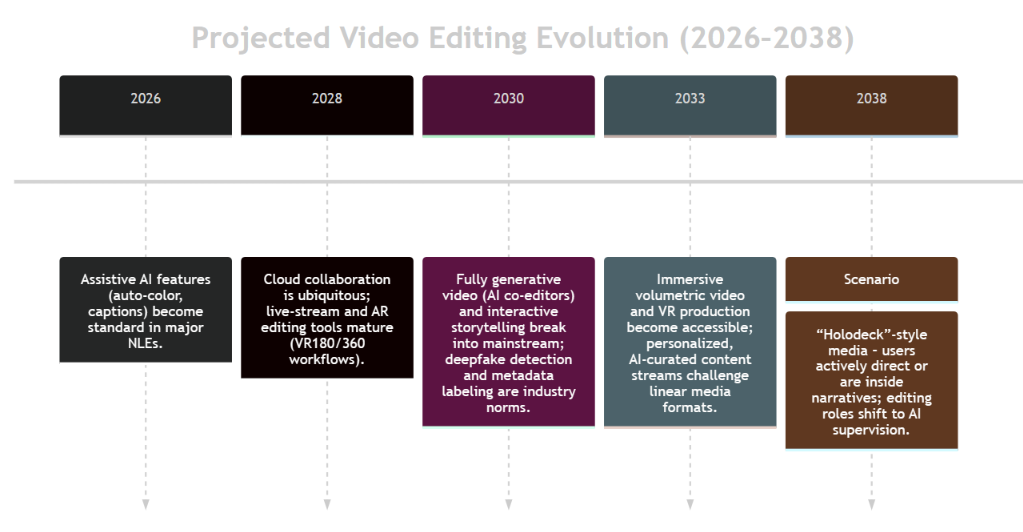
Comparative Summary: Modern editing requires balancing speed vs. quality and authenticity vs. polish. Short-form styles excel on social media but risk fatigue; cinematic edits draw depth but require resources. Tools vary: Premiere and Resolve lead in pro features, while simpler apps democratize editing. Across all, creativity and adaptability remain the common thread.
Example Visual:
Image: A film clapperboard, symbolizing traditional cinematic editing workflows.
Sources: Industry reports, platform announcements, and academic studies were consulted. Key references include Adobe’s 2025 AI feature press release, Blackmagic’s DaVinci Resolve updates, the TVTechnology analysis of editing trends, academic research on short-form editing and engagement, and recent industry surveys. These reveal a consensus: video editing is trending toward faster, AI-assisted, platform-tailored production with strong ethical and accessibility guardrails.
Key References:
- Rahman, A. “Video Editing Trends … 2026” (industry blog).
- Adobe (2025) Press Release: Premiere Pro Generative Extend & AI tools.
- Rhodes, P. (2025) TVTechnology: “Editing Workflows Mature as Vendors Add AI”.
- Dost, F. & Huang, Y. (2026) Conference Paper: “Jump Cut Editing Style…Short-Form Video”.
- Wistia (2026) State of Video Report.
- TikTok Newsroom (2022): “New Editing Tools”.
- Blackmagic Design (2023) Resolve 21 What’s New.
- UC Digital Accessibility (2026): “Publishing Accessible Videos”.
- Miraflow (2026) YouTube CPM Rates by Niche.
- NCSL (2024) “Deepfake Legislation” (deceptive media laws summary).
